
This article explains the basics of using your Gamma Mobile service through PurpleUC, including voicemail, call forwarding, mobile data settings and common troubleshooting steps.
If you need help with your Gamma Mobile service, please call 02038707650 or open a support ticket at helpdesk@purpleuc.com, including your name, company and mobile number.
Getting started
You can start using Gamma Mobile with either a new number or an existing number transferred from another provider.
New number activation
If you do not already have an agreed activation date, please contact PurpleUC to activate your service.
Please call 02038707650 or open a support ticket at helpdesk@purpleuc.com, including your name, company and mobile number.
Once activated, your service should be live within 2 hours.
- Remove the SIM from the holder.
- Insert the SIM into your phone.
- Wait for the service to become active.
Transferring an existing number
If you are transferring an existing number to Gamma Mobile and need help, please contact PurpleUC.
Please call 02038707650 or open a support ticket at helpdesk@purpleuc.com, including your name, company and mobile number.
Voicemail
Voicemail is set up automatically when your SIM card is activated.
The first time you access voicemail, you will be asked to set up your PIN and record your name.
To access voicemail, dial 07782333123 or dial 121 from your Gamma Mobile device.
If you are using an existing handset, make sure any old voicemail numbers and diverts have been removed from the phone’s memory. This can help avoid problems with your new voicemail service.
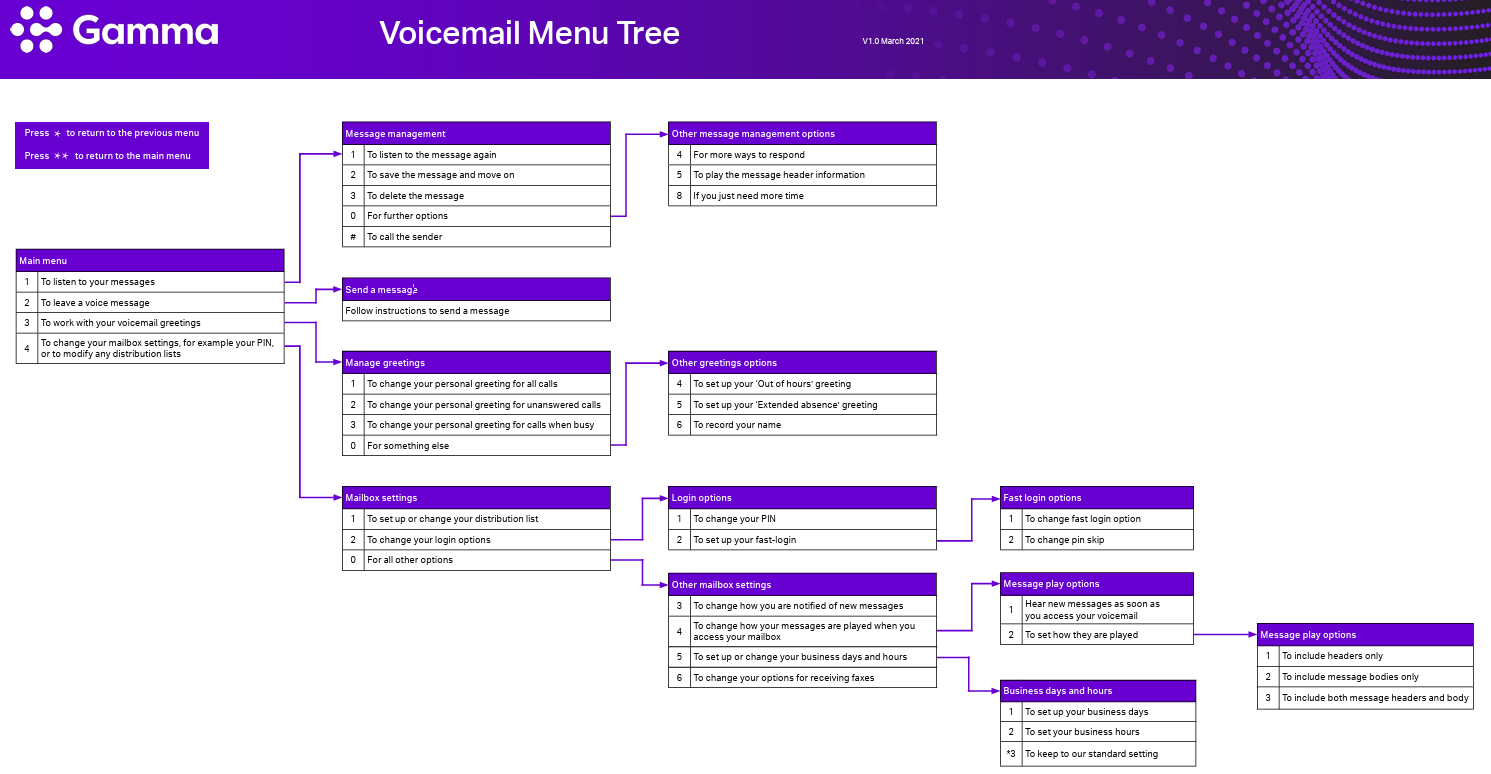
Voicemail menu options
The diagram below shows the Gamma voicemail menu options available when accessing your mailbox.
Call forwarding
By default, unanswered calls, calls when you are busy, and calls when you are unreachable are diverted to voicemail.
You can also forward calls to another number using your device settings or the short codes below.
Conditional call forwarding
Use conditional call forwarding to forward calls when you are busy, unavailable or out of reach.
To set up:
**004*[phone number]#
To switch off:
#004#
To re-activate forwarding to the same number as before:
*004#
Unconditional call forwarding
Use unconditional call forwarding to send all calls to another number. Your device will not ring.
To set up:
**21*[phone number]#
To switch off:
#21#
To re-activate forwarding to the same number as before:
*21#
Mobile data and network settings
If you cannot connect to the internet on your phone, the data settings needed to connect to the network may be missing.
First, text settings to 773000.
If you still need to enter the settings manually, update the APN settings on your phone as follows.
Manual data settings
APN name: Gamma
APN: Gamma
Username: leave blank
Password: leave blank
MMS settings
APN: three.co.uk
MMSC: http://mms.um.three.co.uk:10021/mmsc
MMS proxy: mmms.three.co.uk:8799
Troubleshooting
My device says emergency calls only
Turn the device off for 1 minute, then turn it back on again.
If the problem continues, please call 02038707650 or open a support ticket at helpdesk@purpleuc.com, including your name, company and mobile number.
I have been asked for a PIN code for my SIM
The default PIN for your SIM card is 0000.
Please note that if you enter the PIN incorrectly three times, your SIM card will be blocked for all calls.
I have blocked my SIM card
To unblock your SIM card, you will need a PUK (Personal Unblocking Key) code.
Please call 02038707650 or open a support ticket at helpdesk@purpleuc.com, including your name, company and mobile number.
I didn’t receive my network settings
Turn the device off and on again.
If you still do not receive the network settings, text settings to 773000.
What is the voicemail number to call?
To access voicemail, dial 07782333123.
Alternatively, dial the short code 121 from your device.
If you are using your existing phone, make sure all previous voicemail numbers and diverts are deleted from your phone memory to avoid any difficulties with your new voicemail service.
I can’t connect to the internet on my phone
The data settings needed for your phone to connect to the network may be missing.
Text settings to 773000.
If needed, enter the manual APN and MMS settings shown in the Mobile data and network settings section above.
How do I find my phone details?
You can find your IMEI number by dialling *#06#.
On some devices, the IMEI may also be printed under the battery.
The IMEI is often needed for insurance, troubleshooting, or if your phone is lost or stolen.
My phone is lost or stolen
If your phone is lost or stolen, please call 02038707650 or open a support ticket at helpdesk@purpleuc.com, including your name, company and mobile number.
We can then arrange for your SIM card to be barred.
If you know your device’s IMEI number, we can also arrange for the device to be barred, which prevents it from being used with any SIM on any UK network.
My device is not working with my new SIM
If you are using a phone that was provided by another network, it may be locked to that network.
You will need to contact your previous provider to have the phone unlocked.
Found a problem with this article? Please let us know.